Modern office status boards are clinically boring. A generic Slack dot or a sterile digital tablet screaming “In a Meeting” does nothing for the soul.
As an educator and engineer, I wanted my lab door to project absolute gravitas. And by gravitas, I mean hauling 11th-century artistic flair and self-deprecating academic humor straight out of 1066.
Enter the Bayeux Tapestry E-Paper Status Board. Driven by a web-connected microcontroller, a 7.5-inch monochrome e-ink panel, a custom PHP dashboard, and a healthy dose of grammatically loose Middle English, this display announces my whereabouts to students like a digital medieval artifact.
The Visual Philosophy: “Heikki’s Laboure”
To respect the original aesthetic, every screen mimics the classic “Tituli” (the embroidered Latin inscriptions on the actual tapestry). I opted for Middle English spellings, making liberal use of the historical “V” and “U” swap—because carving curves into a tapestry canvas (or a matrix buffer) is a legendary pain.
The final suite of status screens includes:
- EMAIL: HEIKKI ENJOYETH EMAIL
- TEACHING: HEIKKI TEACHETH STVDENTS
- LAB MAINTENANCE: HEIKKI MAINTAINETH VNIVERSITAS 3D LAB
- SILLY STUFF: HEIKKI MAKETH SILLLY THINGYES
- MEETINGS: HEIKKI ENJOYETH MEETINGYES
- LUNCH: HEIKKI EATETH LVNCH
- AWAY: HEIKKI IS AWAYE TO STRANGE LANDS
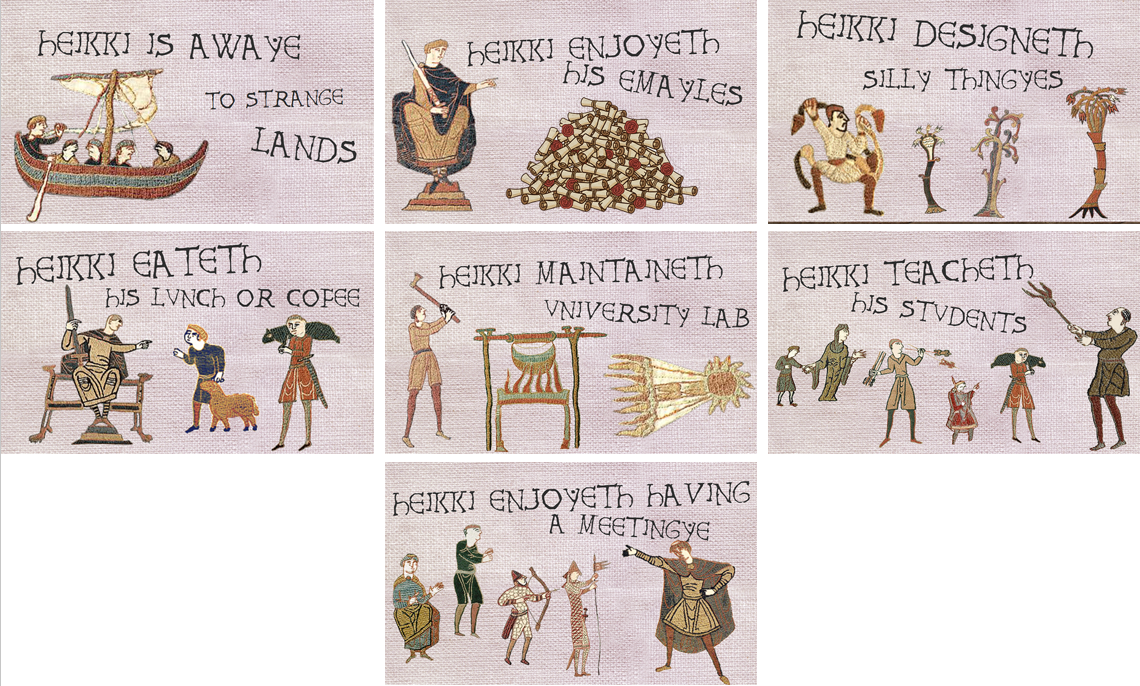
This is the set of images I see on the website, when I change the status. The images can be seen changing on my Instagram.
The Battle with E-Ink: Pure Trial and Error
Taking a gorgeous, color image of woven blue fabric or antique parchment and slamming it into a 1-bit monochrome display (where a pixel is strictly black or white) is where my sanity was tested. If you push a raw image straight over, the screen rewards you with an illegible, muddy smudge.
To make digital pixels actually look like physical linen, I routed everything through Image2cpp using the Atkinson Dithering algorithm. Atkinson provides an organic, stippled “grain” that perfectly mimics a textile from a few feet away.
However, getting the contrast right required a grueling gauntlet of individual adjustments:
- The Inverted Canvas Dilemma: For high-impact statuses like STVPID THINGYES or MEETINGYES, the dark blue fabric background looked incredible when I checked “Invert image colors” and anchored the brightness threshold at 104. This made the white text and character outlines cleanly pop from across the hallway.
- The Fine-Line Trap: When I tried that exact inverted setup on detail-dense layouts like the EMAIL or TEACHING screens, the dithered black dots completely devoured the fine linework (like the horse’s legs and the edges of the scrolls). The solution? I rejected inversion for those specific assets, keeping a clean, white background to let the intricate sketches breathe.
The Backend Architecture
An offline status board is just an expensive desk ornament. To control the sign remotely, I built a lightweight web backend using PHP that serves as my digital control room. This backend is actually the same that has been running my gatekeeper, a 3D printed Moai statue that can display messages and morse them out too. Adding this e-paper capability wasn’t actually very hard – I can update both the image and the message by pressing a button on the website, or, I can just edit the message that the Morse Moai is displaying and sending as morse code.
The control panel features preset buttons for my daily routine. Clicking a button captures a live timestamp, builds a structured 4-line status string, and writes it directly to a flat log file.
Here is the lightweight PHP state-handler:
<?php
    $myFile = "myfile.txt";
    $redirect = false;

    // Handle Preset Buttons
    if(isset($_POST['preset'])) {
        $id = $_POST['preset'];
        $dt = date("d.m. H:i");
        $line1 = "As of $dt, ";
        $line4 = $id; // The critical image index sent to the display

        switch($id) {
            case "1": $line2 = "Heikki is having fun"; $line3 = "teaching students"; break;
            case "2": $line2 = "Heikki maintains"; $line3 = "the 3D + Robo Lab"; break;
            case "3": $line2 = "Heikki seems to be"; $line3 = "enjoying his emails"; break;
            case "4": $line2 = "Heikki is devouring"; $line3 = "his delectable lunch"; break;
            case "5": $line2 = "Heikki is designing"; $line3 = "totally silly stuff"; break;
            case "6": $line2 = "Heikki is taking part"; $line3 = "in a groovy meeting"; break;
            case "7": $line2 = "Heikki is out, but"; $line3 = "try Teams or email"; break;
        }

        $fh = fopen($myFile, 'w') or die("can't open file");
        fwrite($fh, $line1 . "\n" . $line2 . "\n" . $line3 . "\n" . $line4);
        fclose($fh);
        $redirect = true;
    }

    if ($redirect) {
        header("Location: index.php");
        exit();
    }
?>
The real payload here is $line4. This passes the raw asset ID (1 through 7) straight down the pipe to the hardware client.
Under the Hood: The Firmware
The brain of the display is handled by a microcontroller running an efficient paged-drawing loop utilizing the GxEPD library. By loading all seven custom 640 x 384 bitmaps directly into flash memory headers, the device avoids dynamic RAM allocation overhead and updates reliably.
The microcontroller simply performs an HTTP GET request to pull down the text file. It reads the lines, extracts that trailing index integer from line 4, and pipes it straight into an Arduino switch statement to fire a paged screen update:
#include <GxEPD.h>
#include <GxGDEW075T8/GxGDEW075T8.h>
#include <GxIO/GxIO_SPI/GxIO_SPI.h>
#include <GxIO/GxIO.h>

// Import custom 1-bit tapestry bitmaps
#include "maintenance.h"
#include "silly.h"
#include "email.h"
#include "meetings.h"
#include "lunch.h"
#include "teaching.h"
#include "away.h"

// SPI Pin Configurations for the E-Paper Display
const int EPD_CS   = 5;
const int EPD_DC   = 17;
const int EPD_RST  = 16;
const int EPD_BUSY = 4;

GxIO_Class io(SPI, EPD_CS, EPD_DC, EPD_RST);
GxEPD_Class display(io, EPD_RST, EPD_BUSY);

// Global pointer referencing our active state asset array
const unsigned char* nykyinenKuva = maintenance_image;

void naytaKuvaCallback(const void*);

void setup() {
  Serial.begin(115200);
  display.init(115200);
  display.setRotation(0);

  Serial.println("System Ready! Enter 1-7 in Serial Monitor to force refresh:");
}

void loop() {
  // Production loops parse the file index; Serial handles local lab testing
  if (Serial.available() > 0) {
    char input = Serial.read();
    bool validoitu = true;

    switch (input) {
      case '1': nykyinenKuva = maintenance_image; break;
      case '2': nykyinenKuva = silly_image;       break;
      case '3': nykyinenKuva = email_image;       break;
      case '4': nykyinenKuva = meetings_image;    break;
      case '5': nykyinenKuva = lunch_image;       break;
      case '6': nykyinenKuva = teaching_image;    break;
      case '7': nykyinenKuva = away_image;        break;
      default: validoitu = false; break;
    }

    if (validoitu) {
      Serial.println("Refreshing e-paper screen...");
      display.drawPaged(naytaKuvaCallback, 0);
      display.powerDown();
    }
  }
}

void naytaKuvaCallback(const void*) {
  display.fillScreen(GxEPD_WHITE);
  display.drawBitmap(nykyinenKuva, 0, 0, 640, 384, GxEPD_WHITE);
}
Hardware Lessons Learned: Purging the Ghosts
When dealing with heavy Atkinson dithering on a large 7.5-inch panel, you will inevitably run into ghosting. The physically charged micro-particles inside the e-ink screen have an irritating “state memory”. If you attempt a quick partial refresh when transitioning from a dark fabric background (Lunch) to a clean white canvas (Teaching), a ghostly, pixelated shadow of the previous scene will haunt your display.
The fix? Always enforce a full refresh cycle when transitioning between major asset styles. It takes a few extra seconds of flashing, but it purges the screen state completely, ensuring the whites stay bright and the lines remain razor-sharp.
Now, whether I am lecturing or actively smiting an uncooperative 3D printer with a battleaxe, my door sign says it all with timeless, medieval charm.
